

Table of Contents
- Why Compact Desks Matter for Small Home Offices
- Quick Comparison: Our Top Compact Desk Picks
- 1. The Family Nest: Best Overall for Renters and Families
- 2. IKEA Mittzon: Minimalist Design on a Budget
- 3. Claiks Electric Standing Desk: Quick Assembly for Tight Spaces
- 4. ErGear Electric Standing Desk: Height Adjustment Without the Price Tag
- 5. Article Culla Desk: Mid-Century Style in a Slim Profile
- 6. FlexiSpot Electric Standing Desk: Premium Ergonomics for Remote Workers
- 7. Uplift V3 Standing Desk: High-Performance Customisation
- Small Home Office Desk Ideas: Layout and Placement Strategies
- Ergonomic Considerations for Compact Workstations
- Maximising Storage in Compact Workstations
- Cable Management Solutions for Small Desks
- Standing Desk Options for Small Offices
- Material and Finish Options
- How to Choose the Right Compact Desk Size
- Standing Desk vs. Static Desk: Which Works Best for Small Spaces?
- Multi-Functional Furniture Integration
- Weight Capacity and Monitor Arm Compatibility
- Conclusion
- Frequently Asked Questions
Last Updated: October 2, 2026
Why Compact Desks Matter for Small Home Offices
A well-chosen compact desk transforms a tight corner into a productive home office, and compact desks for home offices balance ergonomics, aesthetics, and practicality without sacrificing the features you need. When floor space is limited, the right desk anchors your workflow, defines your work zone, and makes the difference between clutter and function. Modern compact desks balance ergonomics, aesthetics, and practicality without sacrificing the features you need, from minimalist options that blend into bedrooms to height-adjustable standing desks that fit snugly into corners.
This guide helps you find the right compact desk for your space, whether you're setting up in a rental, optimizing a bedroom corner, or carving out workspace in a studio.
Quick Comparison: Our Top Compact Desk Picks
| Desk | Starting Price | Best For | Key Advantage | Space Footprint |
|---|---|---|---|---|
| The Family Nest Collection | Visit site | Renters & families | Free returns, easy assembly | Varies by model |
| IKEA Mittzon | $249 | Budget-conscious users | Affordable, customisable | ~100 × 50 cm |
| Claiks Electric Standing | $280 | Quick setup needed | Rapid assembly, compact frame | ~120 × 60 cm |
| ErGear Electric Standing | $320 | Budget standing desk users | Height adjustment, anti-collision | ~120 × 60 cm |
| Article Culla | $699 | Design-focused professionals | Mid-century aesthetic, solid wood | ~110 × 55 cm |
| FlexiSpot Electric Standing | $399 | Remote workers prioritising ergonomics | Quiet motor, memory presets | ~120 × 60 cm |
| Uplift V3 Standing | $850 | Long-term investment seekers | Customisation, stability at height | Varies by config |
1. The Family Nest: Best Overall for Renters and Families
The Family Nest stands apart for renters and movers: free returns, easy assembly, and a 30-day return policy let you test fit before committing. Their space-saving designs maximise usable surface area without expanding footprint.
For renters and families needing flexible, movable solutions, The Family Nest offers real value, you're buying peace of mind and hassle-free returns.
Best for: Renters, families planning to move, anyone prioritising easy installation and hassle-free returns.
2. IKEA Mittzon: Minimalist Design on a Budget
The Mittzon proves affordable doesn't mean flimsy. Its simple lines and neutral finish let your workspace breathe, and the modular design pairs with IKEA storage systems.
Trade-offs: 45-minute assembly and no built-in cable management. Durability is solid, many users report five-plus years without degradation.
Pros: Affordable, customisable with IKEA storage, clean aesthetic Cons: Requires self-assembly, basic cable management, limited colour options
Best for: Budget-conscious users, minimalist aesthetics, those comfortable with flat-pack assembly.
3. Claiks Electric Standing Desk: Quick Assembly for Tight Spaces
The Claiks assembles in under 30 minutes with a pre-assembled frame. Its compact 120 × 60 cm footprint fits tight spaces, with smooth, quiet electric adjustment. Trade-off: basic cable management (adhesive organizers solve this affordably).
Pros: Quick assembly, compact frame, smooth electric adjustment Cons: Basic cable management, limited colour options, heavier than static desks
Best for: Students and home-based workers with limited space who want standing capability without a long setup process.
4. ErGear Electric Standing Desk: Height Adjustment Without the Price Tag
The ErGear delivers smooth height adjustment with programmable presets and anti-collision safety. Trade-off: utilitarian industrial aesthetic and one-hour assembly with careful motor alignment.
Pros: Affordable electric standing option, programmable presets, anti-collision safety Cons: Limited colour options, industrial aesthetic, heavier than static alternatives
Best for: Budget-conscious users needing standing capability in compact spaces.
5. Article Culla Desk: Mid-Century Style in a Slim Profile
The Culla is furniture, not just workspace. Solid wood construction, mid-century design, and integrated storage drawer reduce clutter.
Pros: Premium aesthetic, solid wood construction, integrated storage drawer, slim profile Cons: Higher price point, no height adjustment, limited colour options
Best for: Design-focused professionals who want a desk that doubles as a furniture statement.
6. FlexiSpot Electric Standing Desk: Premium Ergonomics for Remote Workers
The FlexiSpot offers a quiet motor, reliable presets, and thoughtful cable management in a 120 × 60 cm frame. For remote workers, this refinement reduces frustration over long days.
Pros: Quiet motor, memory presets, thoughtful cable management, good value Cons: Heavier than static desks, standard rather than minimal footprint
Best for: Remote workers prioritising ergonomics and smooth operation in compact spaces.
7. Uplift V3 Standing Desk: High-Performance Customisation
The Uplift V3 offers dual-motor stability, extensive customisation, and comprehensive cable management. Overkill for minimal setups, but justified for permanent offices where durability matters.
Pros: Exceptional build quality, wide customisation, industry-leading stability, comprehensive cable management Cons: Expensive, heavier than alternatives, overkill for minimal setups
Best for: Professionals requiring a long-term, high-quality ergonomic investment.
Small Home Office Desk Ideas: Layout and Placement Strategies
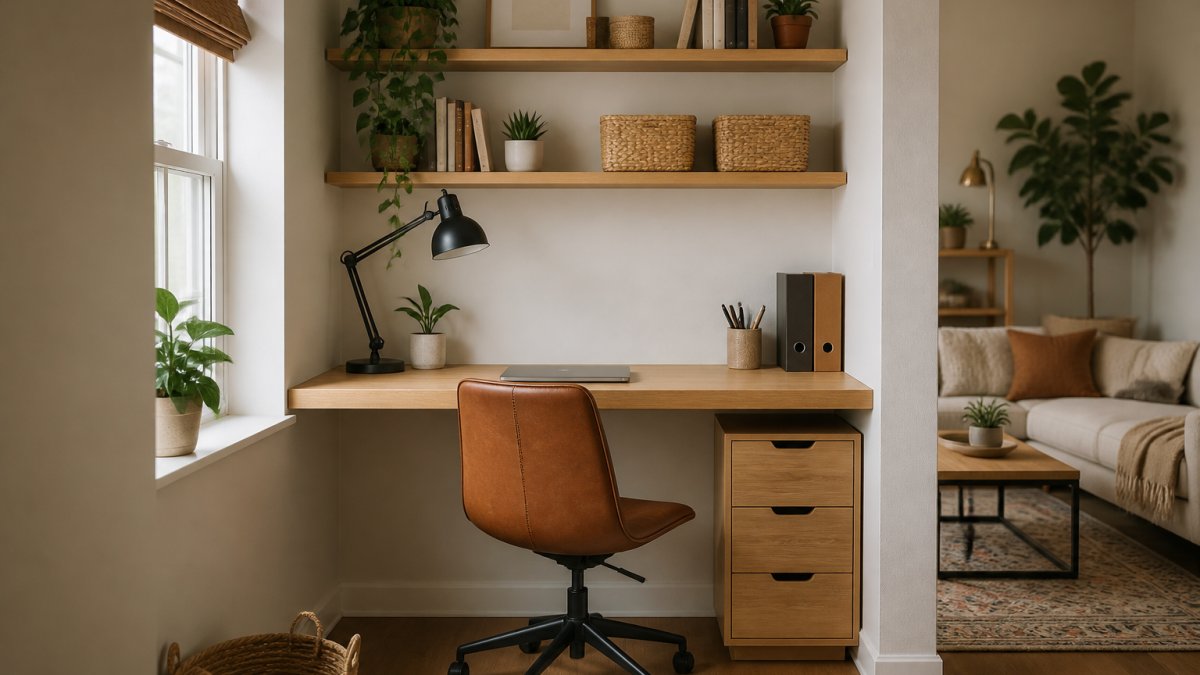
Position desks in corner alcoves or perpendicular to windows for natural light. Use vertical storage (wall-mounted shelves) instead of horizontal footprint. Route cables behind the desk or through trays. Position near windows or add task lighting. Use a monitor arm to free desk space.
Ergonomic Considerations for Compact Workstations
Desk height should allow 90-degree elbows (roughly 70-75 cm). Use a monitor arm to position screens at eye level and free desk space. Choose slim-profile chairs with locking wheels and adjustable height. Position lighting to the side of monitors to reduce eye strain.
Maximising Storage in Compact Workstations
Integrated storage (built-in drawers) keeps supplies accessible without expanding footprint. Vertical storage (wall-mounted shelves, floating cabinets) uses wall space. Under-desk rolling drawers hold files and cables. Organised cables reduce visual clutter. Desktop organisers (pen caddy, file holder, small tray) create zones.
Cable Management Solutions for Small Desks
Route cables behind the desk using adhesive clips or cable trays. Label cables to prevent confusion. Wireless peripherals reduce cable count. Mount power strips under the desk to keep them out of sight.
Standing Desk Options for Small Offices
Standing desks improve circulation by forcing position changes. Electric models are smoother than manual cranks. Verify height range (typically 70-115 cm) and look for dual-motor stability. Memory presets toggle between heights easily. Trade-off: larger footprint (typically 120 × 60 cm or more).
Material and Finish Options
Laminate is budget-friendly but doesn't age well. Solid wood is premium and ages gracefully. Veneer splits the difference. Metal frames are durable and industrial. In small rooms, neutral finishes (white, light grey, natural wood) feel more spacious than dark colours.
How to Choose the Right Compact Desk Size
Measure available floor space and account for chair clearance. Consider workflow: document work needs more surface area; dual monitors need more width. Standard depth is 60 cm; shallower desks feel cramped. Prioritise desks with integrated storage and cable management.
Standing Desk vs. Static Desk: Which Works Best for Small Spaces?
Static desks are cheaper and lighter but sitting all day carries health risks. Standing desks improve circulation and reduce back pain but are heavier and more expensive. A hybrid approach, static desk with monitor arm and standing desk converter, works well for most small-space workers.
Multi-Functional Furniture Integration
Every piece must earn its place. Prioritise desks with integrated storage or pair with multi-purpose furniture. Shelving above the desk adds storage without expanding footprint. Fold-away desks reclaim space but require constant setup. Storage ottomans double as seating and storage.
Weight Capacity and Monitor Arm Compatibility
Check weight capacity before adding peripherals (standing desks typically rate higher than static desks). Verify monitor arm compatibility, some desks accept VESA mounting; others require clamp-on arms. For standing desks, ensure the motor handles monitor arm weight during adjustment.
Conclusion
Compact desks for home offices are solutions designed for how people actually work. The Family Nest collection excels for renters and families: free returns, easy assembly, and a 30-day return policy let you test fit before committing. Visit The Family Nest to explore options designed for small spaces and easy installation.
Frequently Asked Questions
What is the standard depth for a compact home office desk?
Most compact desks range from 40-60 centimetres deep, with 50 centimetres being the sweet spot for small home offices. This depth accommodates a monitor, keyboard, and mouse without consuming excessive floor space. Measure your alcove or corner before purchasing to ensure the desk fits comfortably and still allows room to move your chair. Shallower desks (40 cm) work for laptop-only setups, while deeper models suit dual-monitor configurations.
How do I choose a desk for a small room?
Start by measuring your available floor space and identifying whether you need a static or height-adjustable desk. Consider your work surface requirements: laptop only, single monitor, or dual monitors. Assess storage needs, integrated drawers or shelves help maximise functionality. Evaluate ergonomic design, ensuring the desk height suits your chair and prevents strain. Finally, think about assembly and portability, especially if you're renting and may relocate. The Family Nest provides easy-to-assemble options with clear guides and a 30-day return policy, so you can test fit before committing.
Can a compact desk accommodate dual monitors?
Yes, but you'll need a desk at least 100-120 centimetres wide with sturdy weight capacity. Most compact desks in this width range can support dual monitors when paired with a monitor arm, which frees up desk surface for other work. Check the desk's weight capacity specification, typically 50-100 kilograms, to ensure it handles two monitors plus your computer tower or laptop. Monitor arms are essential for small setups as they eliminate the need for bulky monitor stands, reclaiming valuable workspace.
What features should I look for in a small home office desk?
Prioritise space-saving dimensions, cable-friendly design with built-in cable management, and adjustable height if possible. Look for durable materials like solid wood or powder-coated steel that resist wear. Integrated storage such as drawers or shelves adds functionality without expanding the footprint. If you alternate between sitting and standing, an electric standing desk with memory presets improves office efficiency. Assembly ease matters too, The Family Nest provides installation guides and free returns, making it simple to find a desk that truly fits your workflow.
Are wall-mounted desks better for small spaces?
Wall-mounted and fold-away desks excel at maximising footprint by eliminating legs and using vertical space. They're ideal for studios or bedrooms where floor area is precious. However, they typically offer less work surface and storage than traditional compact desks. Choose a wall-mounted option if you work primarily on a laptop, need to clear the space regularly, or rent and want minimal impact. For multi-monitor setups or all-day work, a traditional compact desk often provides better ergonomics and stability, especially when paired with cable management solutions.