

Table of Contents
- Why a Wall Mounted Desk is the Right Call for Small Spaces
- Tools and Materials You'll Need
- How to Find Wall Studs for Desk Installation
- Choosing the Best Wall Mounted Desk Brackets
- Step-by-Step Installation Process
- Setting the Ergonomic Desk Height for Home Offices
- Managing Cables and Finishing Touches
- Common Mistakes and How to Avoid Them
- Frequently Asked Questions
Last Updated: September 5, 2026
Why a Wall Mounted Desk is the Right Call for Small Spaces
Wall mounted desks are an effective way to reclaim valuable floor space in a compact home office or studio apartment. This guide from The Family Nest walks you through the entire installation process, from locating studs to the final cable tidy.
A floating desk opens up the room visually, making a small space feel larger and easier to clean. For renters and first-apartment dwellers, you get a full-sized work surface without the bulky footprint of traditional furniture.
Tools and Materials You'll Need
Assemble everything on a table before you pick up a drill so the job flows without interruptions.
- Stud finder: Essential for locating the timber frame behind your drywall.
- Spirit level: A 600 mm level is long enough to keep the bracket true.
- Cordless drill and drill bits: You will need a bit for pilot holes and a driver for the screws.
- Wall mounted desk brackets: Choose a pair rated for your desktop weight.
- Timber or butcher block desktop: Cut to your preferred length and depth.
- Screws and wall anchors: Use lag screws for studs and toggle bolts for hollow wall.
- Pencil and tape measure: For marking the height and bracket positions.
How to Find Wall Studs for Desk Installation
Finding a solid anchor point is the single most important step for a safe wall mounted desk installation. A desk bracket fixed only to plasterboard will pull out under load, so your goal is to anchor into something structural.
Timber Stud Walls (Most Modern Homes)
In houses built after the 1960s, you will typically find timber studs spaced 450 mm apart (hud.gov). Run a stud finder across the wall until it signals an edge, mark that spot, then continue to the other side of the same stud; the centre sits between your two marks. Repeat to locate a second stud, as most desks need at least two anchor points.
If you do not own a stud finder, knock for a solid, dull sound rather than a hollow echo, or look for existing screw holes from skirting boards or power outlets, which are typically fixed to a stud on one side.
Metal Stud Walls (High-Rise Apartments)
Many modern apartment blocks use light-gauge steel framing. A magnetic stud finder will locate these, but you cannot use timber lag screws. Steel studs are often only 0.75 mm thick, so a screw alone has minimal holding power; a toggle bolt that opens behind the steel flange spreads the load across a wider area (buildingscience.com).
Drill a pilot hole through the plasterboard and steel stud with a metal drill bit, insert the toggle bolt with wings closed until they spring open behind the stud, then tighten firmly. For a desk holding a monitor and books, use two toggle bolts per bracket.
Masonry Walls (Brick, Concrete, and Hebel)
Older apartments and many terrace houses have solid brick or concrete walls, and some newer builds use Hebel aerated concrete panels. These require a hammer drill with a masonry bit and masonry anchors, typically a nylon wall plug rated for the weight you intend to hang.
Drill a hole slightly deeper than the anchor length, blow out the dust, tap the anchor flush, then drive the bracket screw in. For brick, always drill into the centre of a brick, never the mortar joint, which crumbles under load (concrete.org). For concrete, standard nylon anchors work well; for Hebel, use specialised Hebel anchors that grip the softer material without cracking it.
When You Cannot Find a Stud at All
If your wall is plasterboard over a cavity and you cannot locate a stud, reposition the desk so brackets land on studs, or use heavy-duty plasterboard anchors rated for at least 50 kg per fixing. These are not as strong as a stud fixing, so reduce the load and add a third bracket. Never rely on a single toggle bolt to carry a full desk.
Choosing the Best Wall Mounted Desk Brackets
The best wall mounted desk brackets are rated to carry more weight than your desktop and everything on it. A common mistake is choosing brackets based on looks alone, when the real question is structural integrity.
Look for steel brackets with a clearly stated weight capacity. A pair rated for 45 kg each gives a comfortable margin for a solid timber top, a monitor, and a few books. Bracket depth should match your desktop depth, or sit slightly shorter so the front edge overhangs neatly.
For a cleaner look, consider flush mount brackets hidden beneath the desktop for the true floating effect. If mounting a heavy butcher block top, add a third centre bracket to prevent sagging.
| Bracket Type | Best For | Weight Capacity | Installation |
|---|---|---|---|
| Steel L-bracket | Heavy desktops, daily use | High | Screw into studs |
| Flush mount bracket | Minimalist floating look | Medium | Hidden under top |
| Folding bracket | Temporary or guest desks | Low to medium | Fold down flat |
Step-by-Step Installation Process
With your tools ready and studs marked, installation takes under an hour. Check your level at every step to avoid a crooked desk.
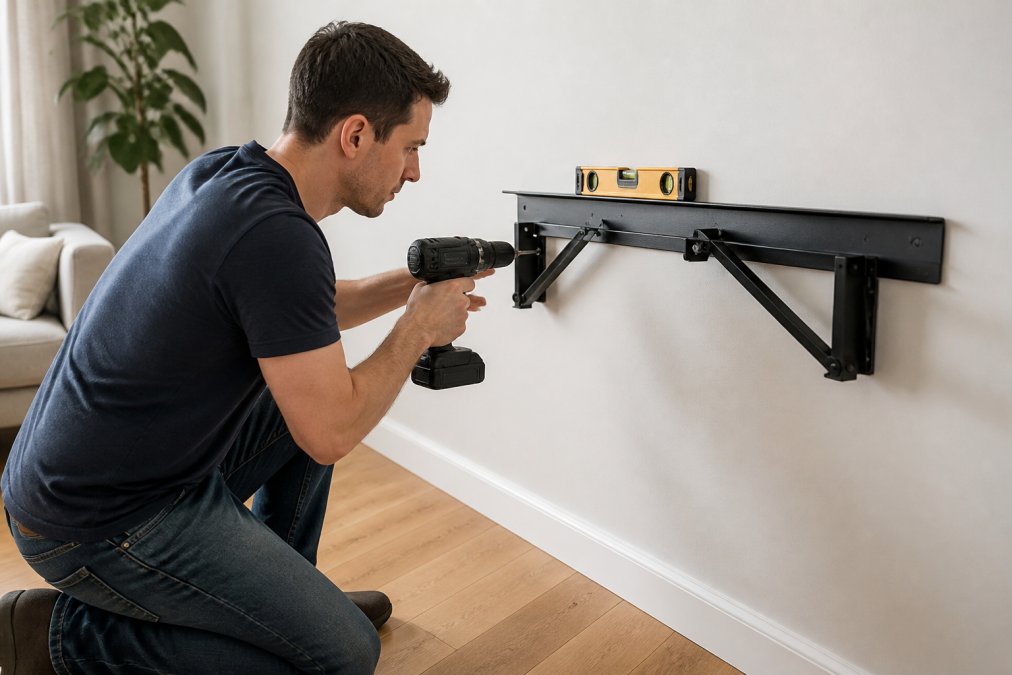
Marking the Height and Levelling the Bracket
Hold the first bracket at your chosen height and mark the top edge. Use a spirit level to draw a faint horizontal line to the second stud position, then align the second bracket to that line so both sit at an identical height.
Securing the Brackets to the Wall
Drill a pilot hole through the drywall into the centre of each stud with a bit slightly narrower than your lag screws; this stops the timber splitting and makes driving easier. Hold the bracket in place and drive the lag screws into the studs.
If a bracket hole does not line up with a stud, use a toggle bolt anchor for that single point. Toggle bolts spread the load across the plaster, but should support only part of the weight, never the entire desk.
Mounting the Desk Top
Rest the desktop on the brackets and check it sits flush. From underneath, drive wood screws up through the bracket holes into the desktop to lock it in place. For a butcher block top, pre-drill these holes to prevent splitting.
Setting the Ergonomic Desk Height for Home Offices
The ergonomic desk height is roughly level with your elbows when sitting with shoulders relaxed and forearms parallel to the floor. A wall mounted desk is fixed, so settle this measurement before you drill.
Sit in your chair in its final position and measure from the floor to your elbow. That distance, typically 650 mm to 750 mm for most adults, becomes the desktop height. Add the thickness of your desktop to find where the top of the brackets should sit.
Managing Cables and Finishing Touches
A wall mounted desk looks best when cables disappear. Run a power strip along the underside, fixed with adhesive clips or small screws, so chargers plug in out of sight. Route the main power cable down the wall into a plastic cable channel painted to match the wall.
For the timber top, sand the edges lightly and apply furniture oil or wax to protect from spills. If using a raw timber top, stain it before mounting. This is also the moment to decide on integrated technology, such as a monitor arm or USB hub, so your workspace stays clutter-free.
Common Mistakes and How to Avoid Them
The most frequent error is skipping the stud finder and relying on plasterboard anchors alone. Anchors hold light shelves, but a desk carries concentrated weight that will tear them out over time. Always anchor at least two points into solid studs or masonry.
Another common mistake is ignoring the wall type. Masonry walls require a hammer drill and masonry anchors. If renting, confirm with your landlord before drilling into brick.
Finally, do not overtighten the lag screws. Driving them too hard can strip the threads in the timber stud. Tighten until the bracket feels firm, then stop.
The Mistake Nobody Talks About: Not Planning for Removal
Most installation guides assume the desk stays up forever. In reality, you will likely move out, rearrange the room, or replace the desktop. Without a removal plan, you risk tearing a chunk out of the wall or leaving a mess that costs you your bond.
When removing the desk, work in reverse: unscrew the desktop from the brackets first, then remove the brackets. Do not pull the desk off while still fixed, as this will lever the screws sideways and enlarge the holes.
How to Patch Plasterboard Holes Like a Professional
For screw holes left by lag screws or toggle bolts, remove loose plaster, then fill with a quality plaster repair compound such as Spakfilla or Polyfilla. Press the filler in firmly with a putty knife and scrape flush. Once dry, sand lightly and touch up with paint. For holes up to 10 mm, a single application is usually enough.
For larger holes, cut a piece of plasterboard slightly larger than the hole, insert a wooden batten behind the wall, and screw the batten to the surrounding plasterboard. Then screw the patch piece to the batten and finish with joint compound and tape.
Repairing Masonry Holes
Masonry holes are more permanent. To patch a brick or concrete hole, clean out dust and debris, then fill with a masonry repair mortar or high-quality exterior filler. For holes larger than 10 mm, pack the filler in layers, allowing each to dry before adding the next. Sand smooth once cured and match the paint colour carefully, as masonry paint shades vary between batches.
Preventing Damage Before It Happens
A few simple steps during installation prevent most removal headaches. Use a small dab of painter's tape on the wall behind the bracket before drilling to stop the plasterboard cracking at the hole edges. Drive screws slowly and steadily, letting the drill do the work.
Frequently Asked Questions
How do I ensure a wall-mounted desk is secure?
The security of a wall mounted desk depends on finding solid wall studs and using the right fasteners. Never rely on plasterboard anchors alone for the main support. Use a stud finder to locate the timber or metal studs behind the wall, then drill pilot holes and secure heavy-duty brackets directly into them. Make sure you also check the weight capacity of your chosen brackets and confirm your desk top is properly attached to them. A correctly installed desk on studs will feel rock solid.
Can I install a floating desk on a plasterboard wall?
Yes, you can install a wall mounted desk on a plasterboard wall, but you must anchor it to the wall studs. Plasterboard alone cannot support the weight of a desk and your equipment. A stud finder is essential for locating the studs behind the plasterboard. If your wall has no studs where you need them, you will need heavy-duty toggle bolts or a mounting system designed for hollow walls. For a desk that will hold a monitor and other gear, direct attachment to studs is always the safest option.
How high should a wall-mounted desk be for ergonomic comfort?
For most adults, the standard ergonomic desk height is between 720mm and 750mm from the floor to the top of the desk surface. This allows your elbows to rest at a 90-degree angle when typing. When marking the bracket position on the wall, subtract the thickness of your desk top from your desired final height. For example, if your desk top is 40mm thick and you want a final height of 730mm, the top of your brackets should sit at 690mm.
What tools do I need to install a wall-mounted desk?
You will need a stud finder, a spirit level, a power drill with drill bits, a socket set or screwdriver, and a tape measure. A pencil is essential for marking the bracket positions. You should also have the correct screws or lag bolts for your bracket type, which are usually included with a quality mounting kit. Having a second person to help hold the desk top in place while you secure it will make the job significantly easier and safer.
This article was written using GrandRanker